Wednesday, October 23, 2013

Fortress Mini / Nano PC

Need the convenience and space an All-in-one PC provides but  want to save money and don't want to ditch your current monitor?   Bitstop Bicol presents the NanoPC.  This particular model comes with the following specs:

AMD E350 processor 1.6ghz
2gb DDR3 ram
320gb harddisk
AMD HD6310 graphics
5x usb ports, SD card slot, HDMI
VGA, Ethernet, Wifi
36 watt AC adapter
comes with stand  and vesa mounting kit.
No operating system, so you still need to purchase a Windows license.

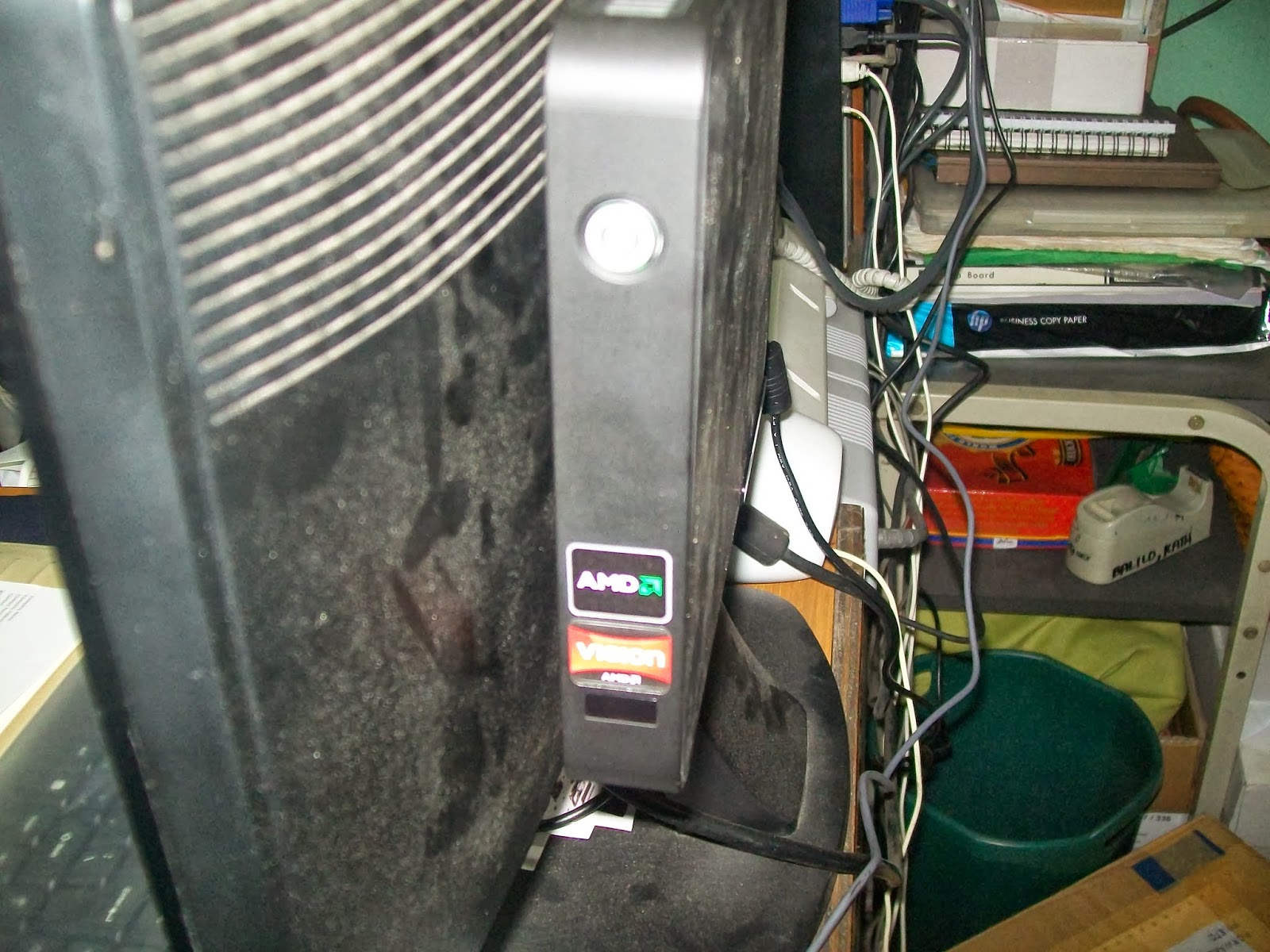
Dimension comes at 8 x 1 x 6.25 inches.  It comes with its own stand or you can mount it behind the monitor.  Basically this is a netbook/laptop turned into a personal computer.  You just have to add the monitor, keyboard and mouse.


The Nano PC mounted behind the monitor.


Bitstop Bicol now an Asus and Fuji Xerox service center

Bitstop Bicol has signed a MOA with MSI-ECS  and we are now a service center for Asus and Fuji Xerox products.  If you have Asus notebooks, netbooks and tablets or Fuji Xerox printers with problem and within warranty, you can bring them to our office for repairs.  Bitstop is also an authorized service center or provider for HP, Brother, Epson and Lenovo products.

Wednesday, June 5, 2013

Microsoft Office 2013

The 2013 version of Microsoft Office is out. With the new version also includes new packaging for the FPP (full product package) edition. The new packaging has a minimalist approach compared to 2007 and 2010 where they are placed in a big plastic case. Office 2013 is placed in a smaller carton box.

The new packaging for Office 2013 as compared with Office 2010.

Saturday, February 9, 2013

AeroCool VS-3 Computer Case

Looking for a stylish yet affordable computer case that is a step above other low-cost computer cases? AeroCool's VS-3 is among that brand's entry level models.


Sunday, January 27, 2013

Kingston's Chinese New Year flash drives 2013

Kingston's annual CNY (Chinese New Year) flash drives are now out. With 2013 commemorating the Year of the Snake, this year's edition features a mascot dressed as a snake. It now has an 8GB capacity than the 4GB of previous editions. The design for the CNY flash drives' packaging get better every year. Unlike last year's dragon flash drives put in a bulky box, the snake flash drives are in a smaller box and has a twine with which you can attach a gift card.


The CNY 2013 flash drive is a limited edition run with a finite quantity. They make wonderful collectibles as well as gifts to your friends and loved ones. Please inquire our office on ordering and purchasing these flash drives.


Tuesday, January 22, 2013

Windows 8 tutorial

One of the immediate obstacles one encounters in Windows 8 is the fact that once you turn on the computer, the first thing that faces you is Windows new interface called the Metro UI. It can be daunting at first but thanks to the internet, there are plenty of resources to get a grasp on the new user interface.

Metro UI shares similar features in the interface that you see in Apple's IOS and Android operating system. Instead of little square icons, we get what Microsoft calls tiles. It might look different but most of what you see in the competition's OS are here too. There's a tile for the e-mail, calendar, browser, pictures, news, music and video. Apps typical of what you see in others. And then you scroll horizontally to get to the other apps, again typical in the other two OS.

Monday, December 3, 2012

Intel's Next Unit of Computing

We recently attended the quarterly Intel Channel Conference. The nice thing about attending these conferences is the constant reminders as to what Intel processors are capable of. More importantly though, we get firsthand view of what the next generation of computers will be. Early in the year, we were introduced to Intel's Ultrabooks, this final quarter of 2012, we meet what they call the NUC or as Intel calls it the Next Unit of Computing.

Sunday, November 25, 2012

Featured product: Asus X401 series notebooks

Ever used a netbook but find yourself limited or disappointed with the specifications over time? Is the 10-inch and 11.6-inch screen too small for you? Do you find your laptop kind of heavy? Ever wanted an ultrabook but find the price out of your budget range?


Asus may just have the notebook for you. Originally, announced and exhibited on June 2012, the X401 series of notebooks is targeted for consumers who believe in this Taiwanese computer manufacturer's quality and craftsmanship but looking for a budget-friendly model.

Sunday, November 18, 2012

Buying items overseas

Thanksgiving in the US is near and that means Black Friday is just right behind. That means sales and discounts on a lot of goodies. But here, we're going to talk about electronic goodies.

It is not surprising then that we will have Filipino expats abroad who will also take advantage of this moment for some hi-tech pasalubong. While Filipino retailers would rather you spend your money here in the Philippines than from some store in the United States, we're still willing to help out and give some advice.

Windows 8 Commercial

It's been playing on the television this past month. Following on the heels of HP's adverts for Ink Advantage printers, here is Microsoft's commercial for their new operating system, Windows 8:


Is the Philippines finally catching up that we have these tech giants finally making advertisements beyond print and now on television and billboards? Let's hope so!

Tuesday, November 13, 2012

Windows 8 has arrived

Windows 8 has arrived. Here is a look at the OEM version of the latest Windows operating system.

For comparison, on the left is the OEM version of Windows 7, to the right is Windows 8. Both Windows Vista and 7 feature an external packaging made of card stock that is basically a mold of the DVD case containing the installer. Windows 8 takes a more minimalist (though I imagine some would say cheap) approach by placing the product in a card stock envelope minus the DVD case.


So, when we open the package, here is what we get. Gone is the DVD case, replaced by a second card stock envelope. The design reflects the minimalist approach by Microsoft for Windows 8 and the color of the packaging is the same as the tiles you will see when actually using the operating system. The COA label also gets a redesign as well. I don't know if it will fit in the space provided by PC manufacturers in some laptop models but a rectangular shape is a good start.

Sunday, November 11, 2012

Using 32-bit key on 64-bit Windows

So, I have a notebook with a Windows operating system pre-installed. The thing is the version installed is a Windows Vista Professional 32-bit. The CPU is a Core 2 Duo. The default memory is a mere 1GB but with an additional slot for expansion purposes. Now, I think why I'm saddled with 1GB. Why can't I upgrade the memory all the way to 4GB?

But wait, didn't they say you couldn't take advantage of the 4GB memory if your OS isn't a 64-bit? That's still true but if you don't mind the extra work, why not reformat your unit with a 64-bit version of Windows Vista?

Sunday, September 23, 2012

I want to use Outlook for e-mail but I’m too cheap to pay for POP mail


Microsoft Outlook is probably one of the most underrated applications in Microsoft Office and yet is consistently present in most editions. I say underrated because most users seem to ignore it. But people who are in business or office work are more likely to use it. It’s just almost right up there with Word, Excel and PowerPoint.

The most common use for Outlook is as an e-mail management application. Your e-mail inbox is the first thing that you see when you open the application. Typically, in order for you to use e-mail in Outlook, you need someone to provide you with an e-mail service. This can be in the form of an ISP (Internet Service Provider) who provides you with an e-mail account. You access that account by configuring Outlook to your host’s POP (Post Office Protocol) or IMAP (Internet Message Access Protocol) settings or any similar protocols. Your ISP might or might not charge you for this extra service. Also, not every ISP provides e-mail service. What are our options?

Sunday, August 12, 2012

Transcend flash drive recovery


On one occasion, I tried using the Win2Flash utility to create Windows 7 bootable USB flash drive. By copying directly from the DVD instead of a copy in the hard drive, I somehow rendered my Transcend USB flash drive unusable. Sure, Windows could still detect the flash drive, it appears in Windows Explorer but it couldn’t read from it nor could I reformat it again to a usable state. I even tried to tinker with its properties in Computer Management. No luck, it seems.

I searched online for anything that I might be able to do to make my flash drive usable again and I came across links for data recovery of flash drives. However, that is not what I wanted. There are no data that needed to be saved, I just wanted the flash drive to work again. After some sifting through the searches, I came across a forum wherein someone has the same problem. The solution, it seems, is to download Transcend’s Online Recovery utility. It seemed to describe what I hope to achieve.

Sunday, June 24, 2012

Can't activate Antivirus

Every once in a while, you are faced with a vexing problem where you try all sorts of solutions only to find that the most effective was so fiendishly simple, you wonder why you didn't even try it first.

I have a client who bought a McAfee Antivirus Plus product and we were tasked with installing and updating it into his laptop. Installing is a snap and the laptop more than meets the system requirements of the Antivirus. As with many retail software these days, you have to register and activate the Antivirus in order for it to work beyond the grace period given to you. This is where the problem came in.

Sunday, February 5, 2012

Fingerprint reader

These days, it is becoming common to have digital fingerprint readers for use as timekeeping devices. Analog bundy clocks are still widely used but biometric fingerprint readers offer an additional advantage in security. They're also good for a few other uses.

Distributors of digital fingerprint readers tend to market them solely as timekeeping devices for the purpose of automatically calculating payroll. Digital Persona seems to have taken the extra step beyond this market limit. Recently, I was able to sell a U Are U 4500 fingerprint reader. Unlike a lot of biometric devices which look a lot like boxes, this is a small device with a USB cable attached to it. This also means that it is permanently attached to a PC. The boxy biometric devices are usually accessible via a LAN or downloading its accumulated data via USB port.